A checklist to implement the Revamping of Sales Tax Reporting and additional longer-term Accounts Receivable maintenance projects on the Eagle System as discussed 14 October. Based on the sales tax quarterly close at the end of November 2015, all work on the set-up of accounts regarding the revamping of tax reporting must be completed before that date. Michael Cinelli has no problems with a gradual implementation of the accounts between now and the November 30th cut-off date.
Tuesday, October 20, 2015
Accounts Receivable Updates & Tasks
A checklist to implement the Revamping of Sales Tax Reporting and additional longer-term Accounts Receivable maintenance projects on the Eagle System as discussed 14 October. Based on the sales tax quarterly close at the end of November 2015, all work on the set-up of accounts regarding the revamping of tax reporting must be completed before that date. Michael Cinelli has no problems with a gradual implementation of the accounts between now and the November 30th cut-off date.

Tuesday, October 13, 2015
October 14th 2015 Office Meeting

Office Meeting Schedule & Outline
Date: 14 October 2015Time: After Payroll - 2 Sessions
Session #1 A/R 11:30AM - 12:30PM
Session #2 A/P 12:30PM - 1:30PM
Notes:
- Session outlines / attendees listed below
- If those sessions conflict with lunch schedules or coffee breaks, they can be swapped accordingly
Monday, October 12, 2015
Import pdf Vendor Invoices Into Eagle Document Scanning Queue
Import Documents
(Document Scanning users)Use the following procedure to import electronic documents (Micosoft Word files, Adobe PDF files, image files, etc.) into the Document Scanning (DS) application. Electronic documents must not exceed 250KB in size. Executable type files cannot be imported; this includes files with extensions .EXE, .BAT, .VBS, and .SCR.
Thursday, July 30, 2015

Tuesday, July 28, 2015
Adding User (Employee) Records, Tracking Performance & Establishing Security Capabilities
Modern Paint Group: Adding User (Employee) Records, Tracking Performance & Establishing Security Capabilities
First: Determine the "Type" of Employee
C = Sales Clerk - Working at 1 Location / Store
M = Multi-Store Clerk - Does/Could Work at Multiple Locations
O = Office Staff - Doing Back-Office Work
X = Does not use the Eagle - But Clocks In (Drivers, etc.)
M = Multi-Store Clerk - Does/Could Work at Multiple Locations
O = Office Staff - Doing Back-Office Work
X = Does not use the Eagle - But Clocks In (Drivers, etc.)
Saturday, June 6, 2015
Level 24 Upgrade - Part 1 / Security

Eagle Level 24 Update
To all Employees:Due to the recent formation of the Modern Paint Group and their migration off the masonry Depot Eagle System, as well as new national regulations to be fully Payment Card Industry Compliant in 2015, we have upgraded our system to Epicor's Level 24.1 software. There are several minor changes and enhancements which will be implemented in two phases prior to the conversion of Modern Hardware's data off the New Rochelle Servers:
Phase #1A - System Security Updates
Following the hardware upgrade, in which new credit card readers / signature pads were installed at each POS station and firewalls upgraded at each location, we are required to update our software accordingly:1. Make certain the ONLY anti-virus / firewall software installed and running on your system (in the tray at the lower right-hand side of your taskbar, adjacent to the time) is SonicWall Enforced client software:
 2. In addition, do not enable Windows Firewall - regardless of system warnings you may receive in the Windows Action Center to activate their firewall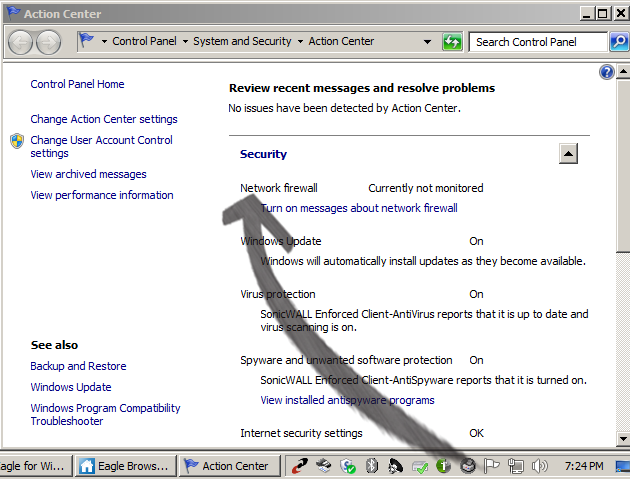


Phase #1B - Eagle Security Updates
In addition to the four (largely invisible) changes that have already been implemented above, your Eagle programs will operate slightly differently. In addition to enhancements and implementation of Eagle N Series upgrades which will be covered in a subsequent message, the following 2 changes tafe effect immediately1) Signon - Sign on automatically required at the launch of any Eagle application: Eagle Browser launch and all programs opened from your Desktop icons

2) Terminal Numbers - All stations are assigned NEW terminal numbers. If your cash balancing worksheets used to be listed by terminal number / drawer, please note your new terminal number assignemnts in the top of the Eagle program windows
Network Access


Keep an eye out later this week for a full listing of new features on Level 24 / Eage N-Series software
Monday, June 1, 2015
Receivables / Payables / Purchase Receipts Document Scanning

Subscribe to:
Posts (Atom)