Monday, October 12, 2015

Import pdf Vendor Invoices Into Eagle Document Scanning Queue

Import Documents

(Document Scanning users)
Use the following procedure to import electronic documents (Micosoft Word files, Adobe PDF files, image files, etc.) into the Document Scanning (DS) application. Electronic documents must not exceed 250KB in size. Executable type files cannot be imported; this includes files with extensions .EXE, .BAT, .VBS, and .SCR.

Tuesday, July 28, 2015

Adding User (Employee) Records, Tracking Performance & Establishing Security Capabilities

Modern Paint Group: Adding User (Employee) Records, Tracking Performance & Establishing Security Capabilities

First: Determine the "Type" of Employee

C = Sales Clerk - Working at 1 Location / Store
M = Multi-Store Clerk - Does/Could Work at Multiple Locations
O = Office Staff - Doing Back-Office Work
X = Does not use the Eagle - But Clocks In (Drivers, etc.)

Saturday, June 6, 2015

Level 24 Upgrade - Part 1 / Security

Eagle Level 24 Update

To all Employees:

Due to the recent formation of the Modern Paint Group and their migration off the masonry Depot Eagle System, as well as new national regulations to be fully Payment Card Industry Compliant in 2015, we have upgraded our system to Epicor's Level 24.1 software. There are several minor changes and enhancements which will be implemented in two phases prior to the conversion of Modern Hardware's data off the New Rochelle Servers:

Phase #1A - System Security Updates

Following the hardware upgrade, in which new credit card readers / signature pads were installed at each POS station and firewalls upgraded at each location, we are required to update our software accordingly:

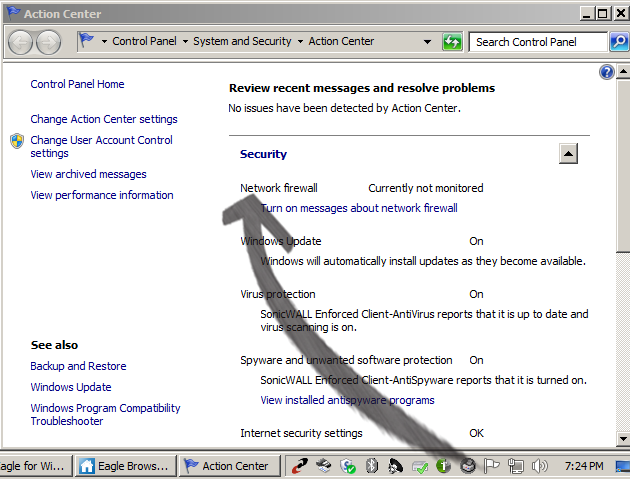
1. Make certain the ONLY anti-virus / firewall software installed and running on your system (in the tray at the lower right-hand side of your taskbar, adjacent to the time) is SonicWall Enforced client software: 
2. In addition, do not enable Windows Firewall - regardless of system warnings you may receive in the Windows Action Center to activate their firewall

3. Avoid downloading any or all "free anti-virus" solutions from websites. Most notorious is the bundling of McAfee Security Scan Plus whenever you;re required to update your Adobe Flash Player. Make cetain to UN-check the "Optional Offer" to install that program before downlaoding / installing Adobe's Flash

4) As of today's date, every terminal across all four locations has e-Connect software running on it. This program makes updating future updates to the Eagle software much easier to perform - as the software is installed remotely and downloaded to each terminal. With the exception of Michelle at the Modern Corporate office and the 3 old Windows XP stations at the Modern Hardware store, all upgrades will be done without the need to download client software on each station / PC. If you do not have e-Connect running, please notify Vito in New Rochelle

Phase #1B - Eagle Security Updates

In addition to the four (largely invisible) changes that have already been implemented above, your Eagle programs will operate slightly differently. In addition to enhancements and implementation of Eagle N Series upgrades which will be covered in a subsequent message, the following 2 changes tafe effect immediately

1) Signon - Sign on automatically required at the launch of any Eagle application: Eagle Browser launch and all programs opened from your Desktop icons 


2) Terminal Numbers - All stations are assigned NEW terminal numbers. If your cash balancing worksheets used to be listed by terminal number / drawer, please note your new terminal number assignemnts in the top of the Eagle program windows
Network Access


Keep an eye out later this week for a full listing of new features on Level 24 / Eage N-Series software

Monday, June 1, 2015

Receivables / Payables / Purchase Receipts Document Scanning


In an attempt to scale-back our filing time and enable easier access to receiving and payables information, effective June 1, 2015, Masonry Depot is implementing a Document Scanning solution to our system and office procedures.

Wednesday, May 20, 2015

Epicor Eagle Community & Hardlines Digest (With ROCK AP Report)


To All Masonry Depot Group (and Modern Hardware) Office / Management Personnel:
I would encourage you all to signup & join the following discussion / user groups:
Epicor Eagle Community
A resource for questions, answers and tips on all things Eagle.

To those of you that do Accounts Payable:As some addressees above do accounts payable, if included instructions from that user group on how to use report name ROCK. (See Below)

To Modern Hardware Office / Management Personnel:
As other addressees above work at out former smaller cousin, Modern in addition to the Epicor Eagle Community, I would encourage all Modern Hardware employees to subscribe to John Fix's user group (of Cornell True Value of Easchester):
Hardlines Digest.
In addition to computer questions, it is a forum with approximately 10 threads a day focused on pain and hardware stores - from hints, tips, how tos and how much -- to for sale, to buy, etc, etc.. Threads are automatically funneled to your email (and can be routed to a user defined "Hardlines" folder to keep your inbox less polluted.

Tuesday, May 19, 2015

POS Procedures for Credit Returns


POS Procedures for Credit Returns

Please note: In addition to:
1. Billing lag times / Invoicing prior to shipment
2. Receiving lag times
3. Inaccurate counts
4. Supplier indecrepencies
5. Blown inter-store transfers
6. Theft
7. Human / clerical error
8. Items cut or converted to other sizes and not adjusted in the Eagle  (bluestone treads / angle irons)

One of the smaller contributing factors (number 9 on the list above) for inaccurate physical QOH counts stems from POS crediting options. Note the screen shots directly below: